

BuildTools
6 Reviews 5/5 ★ ★ ★ ★ ★AI-powered construction management software for custom home builders and remodelers with a client portal, project scheduling, and QuickBooks sync.
Product Overview
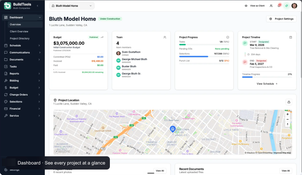
BuildTools is an innovative construction management software for custom home builders, residential remodelers, and design-build construction firms. It provides a single platform for managing the entire construction site, from controlling project budgets and customer selections to tracking project progress, storing documents, and managing change orders. BuildTools integrates natively with QuickBooks for accounting and offers a mobile app and client portal to enhance the customer experience.
Formerly owned by ECI Software Solutions, BuildTools returned to founder-led ownership and relaunched as an AI-first platform in 2026. Its new AI assistant reduces manual work by auto-drafting change orders, RFIs, and client emails, and includes a project intelligence suite that finds problems before they become expensive.
Pros
- Client portal for communication, selections, and digital approvals
- Integration with QuickBooks Online
- AI drafted change orders, RFIs, and client emails
- Share read-only schedules with clients and subcontractors
Cons
- Every plan requires a 12-month contract
- Gantt scheduling can feel awkward to use
Target Market
Custom home builders and remodelers of all sizes who need project management software.Not Recommended For
Production home builders or commercial construction companies.BuildTools is built specifically for custom home builders and residential remodelers. It supports the full construction lifecycle, from bids and proposals through selections, change orders, and daily field reports.
BuildTools Key Features:
Budgets and Job Costing
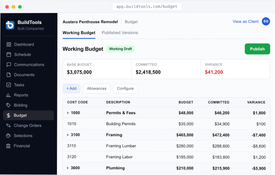
- Track original and revised budgets, committed costs, actual invoices, and remaining balances by cost code.
- Edit budgets inline in a spreadsheet-style view with formulas and variance highlights. View projected profit margins while jobs are still in progress.
- Sync budgets to QuickBooks, with variance and remaining balance updating on each PO and invoice.
Client Portal and Approvals
- Give homeowners a simplified view of the published budget, schedule milestones, photos, selections, and documents.
- Control what each client can see, and provide ongoing project updates.
- Digitally route proposals, contracts, change orders, and selections to clients for eSignature. Client approvals are recorded and tracked for all jobs.
Selections and Allowances
- Send clients a curated allowance list to pick finishes, fixtures, and products from.
- Track allowance balances, selection deadlines, and vendor details for each pick.
- Show the pricing impact of each selection before the client approves it.
Change Orders
- Change orders are created automatically from client selections.
- Require client approval and signatures before any work proceeds.
- Track each change order’s status from draft through client signature.
Purchase Orders, Invoices, and Draws
- Issue POs and receive invoices tied to the correct job and cost code.
- Route invoice approvals so costs post to the right budget line.
- Manage owner draws and track draw status.
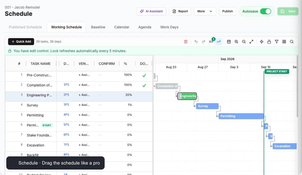
Scheduling and Gantt Charts
- Build schedules with drag-to-edit dependencies, lag, milestones, and predecessor links.
- Calculate the project’s critical path automatically.
- Publish read-only schedules for clients and trade partners to review.
Field Photos and Daily Reports
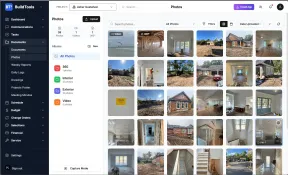
- Tag jobsite photos to the correct project and day automatically.
- Log daily activity, notes, and progress records by project and date.
- Use the provided mobile app to capture project photos and record daily project notes.
Bidding and Trade Partner Management
- Create bid packages and track bidders by trades.
- Store vendor and subcontractor details in a single database.
- Track insurance certificates and vendor compliance status.
Plans, Documents, and Takeoffs
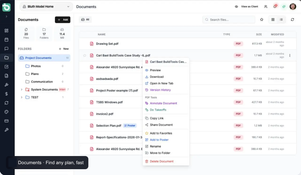
- Store documents, project plans, specs, RFIs, submittals, and contracts with version history and sharing controls.
- Mark up PDFs and compare plan versions and revisions in the browser.
- Run quantity takeoffs from project drawings and plans without separate software.
AI Assistant and Project Intelligence
- Draft change orders, RFIs, scopes of work, and client emails from a one-line prompt.
- Use AI to surface project risks, missing approvals, budget variance, and stale items across active jobs.
- Connect outside AI tools through the MCP connector.
BuildTools Pricing
BuildTools pricing starts at $499/month on a 12-month term. It offers 3 plans based on the type of builder:
- The Core plan includes 5 seats and offers the core project management tools.
- The Professional plan includes 10 seats and adds design and communication features for growing builders.
- The Enterprise plan includes 15 seats with advanced project management features for established builders.
BuildTools offers free setup and guided onboarding for new customers. Discounts are available upon request for upfront annual payments.
Product Overview
Developer Overview
Related Products


User Reviews of BuildTools
Write a Review
Our clients love BuildTools!
Our clients love BuildTools! It’s so much easier for them. They can access information without having to track down someone to get answers and can approve items directly from the system.

I'm saving anywhere from 20 to 30 hours on each job
With BuildTools, bids automatically flow into the system, allowing me to quickly check if they’re the lowest or if we’re missing any bids. And it integrates seamlessly with our budgeting process. I’m saving anywhere from 20 to 30 hours on each job using BuildTools.
We love the financials, budget, and change-order functions
We love the financials, budget, and change-order functions in particular. We anticipate the ability to compare costs to projects’ allowances and change orders alone will help us capture another $ 15K-$20K a year.

We are now a builder of choice
I am surprised how well the subcontractors have taken to it. They love it as much as we do because it saves all of us so much time day-to-day. We are now a builder of choice, and much of that success is owed to the efficiencies and improvements brought about by BuildTools
BuildTools helps me run my business better
BuildTools helps me run my business better. It’s as simple as that. It’s increased my gross margin by 2.5 points per house.
It’s amazing. I can manage the business better than I ever could the old way.
BuildTools Review
We can schedule ongoing tasks… and everyone who needs it gets it. And it’s two-way. The individual can notify and send pictures of completed projects to all involved.
