

MEX CMMS
5 Reviews 5/5 ★ ★ ★ ★ ★A technician-first CMMS built for manufacturing companies that helps reduce downtime, improve asset reliability, and streamline maintenance operations.
Product Overview
MEX is a cloud-based computerized maintenance management system (CMMS) built for manufacturing companies that need more than basic work order management. It helps maintenance teams reduce downtime, improve asset reliability, and streamline maintenance operations by bringing assets, preventive maintenance, work orders, inspections, inventory, and maintenance history together in one connected platform.
MEX is trusted by manufacturers across food & beverage, mining, utilities, fleet, and other industrial sectors. It combines technician-first workflows, mobile and offline capabilities, AI-powered insights, and comprehensive reporting to help teams improve maintenance performance, support compliance, and keep operations running.
MEX can be deployed as a standalone CMMS or integrated with existing accounting, ERP, procurement, fleet management, and other business systems using GraphQL and JSON APIs.
Pros
- Technician-first design with intuitive workflows
- Native mobile apps with offline capabilities for field techs
- Connects all maintenance workflows and assets in one platform
Cons
- Pricing requires a custom quote
Target Market
Manufacturing, food & beverage, mining, utilities, fleet, and other asset-intensive organizations are looking to improve maintenance operations. Ideal for teams seeking a CMMS that scales with their business.Not Recommended For
Organizations that don’t require a dedicated CMMS or have little to no ongoing maintenance operations.Key Features
MEX maintenance software combines your assets, PMs, and maintenance workflows into one platform. Key features include:
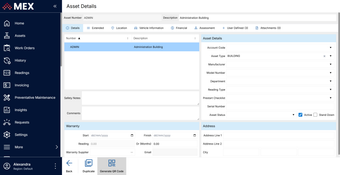
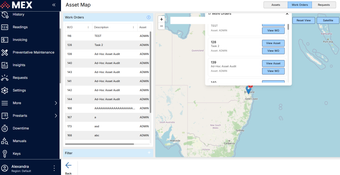
- Asset Management - Track equipment, vehicles, and machines from acquisition to disposal, with history, documents, and performance data attached to each asset.
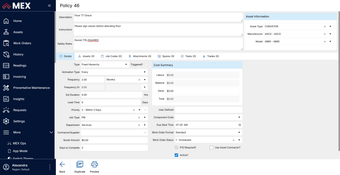
- Preventive Maintenance Scheduling - Schedule preventative maintenance tasks by calendar date or equipment usage. Assign internal or external staff, spare parts, and work instructions to each maintenance work order.
- Work Order Management - Turn incoming maintenance requests into assigned, tracked work orders. Filter work orders 18 different ways to prioritize by things like urgency, status, due date, and assigned trade.
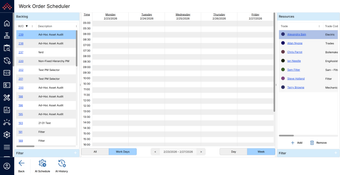
- AI Maintenance Scheduling - Review open work orders and automatically assign maintenance tasks to the right technician based on their trade, skills, and availability. Preview and approve every schedule before it goes live.
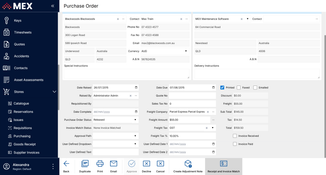
- Inventory Control - Track spare parts, tools, and materials used during work orders. Received automated reorder alerts and reserve stock against upcoming work orders, so a job isn’t held up waiting on a part.
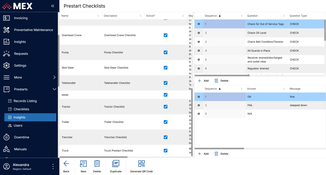
- Prestart Checklists - Run digital pre-use safety and compliance checks before equipment is used. Failed checks can automatically create a maintenance request depending on urgency.
- Asset Hardware Readings - Record usage, hours, meter, and fuel readings against each asset, and trigger a work order automatically when a reading crosses a set threshold
- Inspections - Schedule and carry out field inspections in MEX Mobile, capturing results, photos, and notes on the spot, online or offline.
- MEX Mobile - Manage work orders, inspections, checklists, and meter readings on the shopfloor. Can be used online or offline and comes with barcode and RFID scanning.
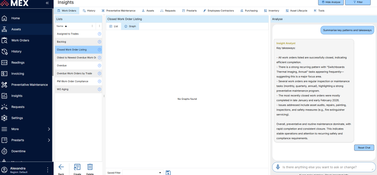
- Reporting - Analyze cost, asset performance, and audit data across 46+ standard reports, or build custom reports and charts by describing what you want in plain language.
- Integrations - Connect MEX with accounting, ERP, procurement, SCADA, fleet management, and other business systems using standard GraphQL and JSON APIs. Common integrations include Xero, MYOB, SAP, Microsoft Dynamics, Citec, VisionLink, and more.
Pricing
MEX uses named-user pricing starting at $60/user/month with three subscription tiers: Standard, Professional, and Enterprise. Pricing is transparent and designed to scale as maintenance operations grow. It offers a free trial and customers can start with the functionality they need and expand over time with optional modules and additional users.
MEX is available as both cloud (SaaS) and on-premises deployments to offer additional flexibility.
Product Overview
Developer Overview
Related Products


User Reviews of MEX CMMS
Write a Review
- Food & Beverage
One of the best CMMSs I've used
MEX is already showing the business that we are top-heavy with trades waiting around for breakdowns. With this information, we can now plan more effectively by having trades onsite when required to carry out planned maintenance activities and not just be a breakdown team, giving them more machine uptime. MEX is by far one of the best CMMS I’ve used so far in my career. Its functionality makes it an easy system to implement, which in turn gives ease of use to the end user (maintenance trades). Regions is a great tool to set up multiple site locations across the business, ensuring we have a standardized asset tree and control files.
- Food & Beverage
MEX has been 100% supportive
We have implemented a national structure for Asset Management and are using MEX as the tool for this system across a large number of sites Australia-wide that have varying processes. The team at MEX has been 100% supportive of all our requests and the time this regionalized system has taken for us to roll out. The flexibility to our requirements has been extremely helpful, with everyone from the receptionist to technical support and managers always more than happy to assist.
Pros
Ease of use, functionality, ease of data capture, and quick recall.
- Fleet & Logistics
MEX makes everything easier
MEX makes everything easier. Everything is now in one place. It has improved our maintenance management and staff efficiency. We no longer rely on individual calendar reminders; MEX allows everyone to view maintenance updates and schedules, giving us confidence in our maintenance and equipment.
Pros
The system is intuitive and user-friendly, with knowledgeable tech support.
- Government
MEX goes beyond
The MEX software goes beyond the capabilities of just fleet and plant. Nearly any scheduled event in maintenance can be customized.
- Manufacturing
MEX is an excellent tool
MEX is an excellent tool for displaying maintenance records, preventive maintenance schedules, and work completed for external auditors.
