

Tenna
An equipment management platform for construction contractors tracking heavy equipment, vehicles, and tools in one system.
Product Overview
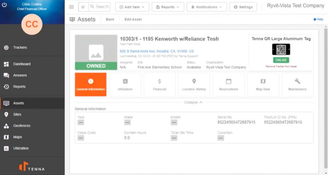
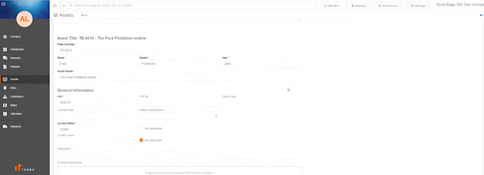
Tenna is an equipment management platform for construction contractors that run heavy equipment, trucks, attachments, and small tools. It combines GPS tracking, maintenance, safety compliance, dispatching, and job costing in one system, using its own tracker hardware alongside OEM telematics integrations.Pros
- Tracks equipment, vehicles, and tools together
- Assigns repair labor and parts to jobs
- Pulls engine hours and fault codes automatically
Cons
- No published pricing or free trial
- Setup and training priced separately
- Maintenance and other key modules are paid add-ons
Target Market
Heavy civil, MEP, and other specialty contractors with $50 million to $500 million in annual revenue running mixed fleets of heavy equipment, trucks, attachments, and tools across multiple job sitesNot Recommended For
Trucking and delivery fleets with only on-road vehicles, or small crews that need basic GPS tracking for a few vehicles and can’t justify installation and setup costs.Tenna is an equipment management platform that combines asset tracking, maintenance, safety and compliance, dispatching, and equipment job costing in one system. It uses its own trackers alongside OEM telematics feeds to collect location, engine hours, and fault code data. John Deere acquired Tenna in early 2026, but Tenna continues to operate independently and support equipment from other manufacturers.
Target Market
Tenna is designed for heavy civil, MEP, and other specialty contractors that manage heavy equipment, trucks, attachments, and tools across multiple job sites. It’s best suited to contractors with $50 million to $500 million in annual revenue and enough assets to justify tracker installation, setup, and training. Fleets that only run on-road vehicles, or small crews needing basic GPS for a few vehicles, will likely find simpler systems easier to adopt.
Key Features
Asset Tracking and Management
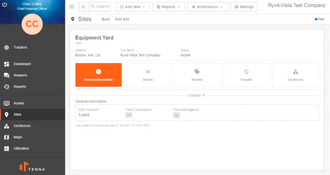
- View asset locations on maps, set up job sites, and create geofences with entry and exit alerts.
- Monitor equipment utilization to find idle or overused assets.
- Analyze asset performance through analytics and reporting dashboards.
- Access equipment data from the Tenna mobile app.
Maintenance
- Schedule preventive maintenance by engine hours, mileage, or time intervals, with alerts when service is due.
- Create and track work orders with photos, parts, and labor details.
- Log mechanic labor by equipment, job, or cost code with mechanic time cards.
- Track parts inventory across locations with restocking alerts.
- Receive diagnostic trouble codes (DTCs) from Tenna trackers and OEM telematics integrations.
Safety and Compliance
- Record video and detect driving events with dual-facing AI dash cams for trucks and heavy equipment.
- Evaluate drivers and fleet safety with driver scorecards and operations scorecards.
- Build custom equipment inspection checklists.
- Manage driver vehicle inspection reports (DVIRs), electronic logging device (ELD) requirements, and IFTA fuel tax reporting.
Resource Management and Dispatching
- Let superintendents and foremen submit requests for equipment, materials, laborers, or crews from the field.
- Assign equipment, operators, and crews to jobs from a drag-and-drop dispatch board, filtered by project, location, or asset type.
- Check equipment availability, location, and maintenance status before dispatching.
- Flag double-bookings, overlapping assignments, and other scheduling conflicts automatically.
Asset Financials
- Assign equipment expenses to jobs and cost codes automatically, using geofences and telematics data to track where and how each machine is used.
- Set rate rules with company-wide templates and job-level overrides, including separate rates for working and idle time.
- Generate internal billing documentation based on actual equipment usage.
- View real-time profit and loss by machine, job, and period.
Integrations
- ERP and accounting: Sync asset data, hours of use, mileage, and site information with Spectrum, Sage 300 Construction and Real Estate, Sage 100 Contractor, COINS, and FOUNDATION. Viewpoint Vista receives asset data, hours of use, site information, and location, with optional work order and fuel cost integrations.
- Equipment management: Share equipment and location data with Fleet Cost & Care.
- Project operations: Connect with Procore, B2W, and RiskCast.
- OEM telematics: Pull machine data from CAT VisionLink, John Deere JDLink, Komatsu Komtrax, and Volvo CareTrack.
Trackers
Tenna sells its own tracker hardware for each asset type:
- Heavy and midsize equipment: TennaCANbus, TennaINTEL, and TennaMINI trackers.
- Fleet vehicles: TennaFLEET trackers.
- Cameras: TennaCAM for fleet vehicles and heavy equipment.
- Tools, attachments, and small assets: TennaBLE Bluetooth beacons and TennaQR tags.
Tenna Pricing
Tenna doesn’t publish pricing and doesn’t offer a free trial or self-serve plan. Quotes are custom and based on the number and type of assets you track. The core platform, TennaCORE, includes data and hardware pricing based on asset count. Maintenance, Safety & Compliance, and Integrations are premium add-ons, also priced by asset count. Implementation and training are quoted separately.
Factors that affect pricing:
- Number of assets, split by type (heavy equipment, fleet vehicles, midsize equipment, small assets, attachments, and consumables)
- Premium modules added to TennaCORE
- Tracker hardware and installation
- Number of training locations and how long training runs
- Integrations with accounting, ERP, or construction software
Product Overview
Developer Overview
User Reviews of Tenna
No reviews have been submitted. Do you use Tenna? Have you considered it as part of your software evaluation process? Share your perspective by writing a review, and help other organizations like yours make smarter, more informed software selection decisions!
