

Zaptiva
1 Review 5/5 ★ ★ ★ ★ ★An agentic AI platform that executes end-to-end business processes across finance, operations, marketing, and sales, and simplifies data management.
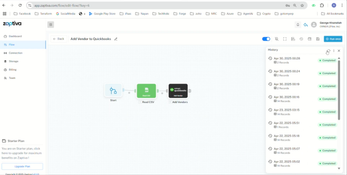


Product Overview
Zaptiva is a low-code software that integrates with various business applications and data sources, including major ERP platforms and QuickBooks, to streamline workflows. It automates accounting and operational tasks typically dependent on spreadsheets, scripts, or manual oversight.
The platform follows your predefined business logic, evaluates incoming data, and leverages artificial intelligence to form decisions. It then carries out routine processes from start to finish, rather than acting like a basic integration or file-import tool.
Zaptiva’s intelligent automation layer can interpret documents, assess exceptions, and recommend actions without constant human review. Because these actions are logged and can be audited, staff can still intervene should something fall outside your defined rules.
Pros
- Automates full workflows, not just data transfers
- Built for ERP-powered environments
- Clear monitoring, logging, audit trails
- Offers low-code/no-code configuration
Cons
- Too complex for one-off file imports
- Requires initial process definition
- Pricing depends on automation depth & scope
Target Market
Businesses with $1 to over $500 million in annual revenue that still rely on manual workflows. It’s commonly used in construction, distribution & logistics, eCommerce, education, energy, government & military, manufacturing, and the trade and professional services industries.Not Recommended For
Replacing dedicated import/export systems or serving as a standalone logistics EDI platform.Zaptiva sits between systems like ERP, CRM, WMS, payroll, email, banks, and EDI partners. It’s most commonly utilized by:
- Technical teams building complex integrations
- Companies needing rule-based automation with selective AI assistance
- Teams needing better control over data & hosting (cloud or self-hosted)
- Business and operations users seeking visual automation
- Executives focused on cost control, efficiency, and risk reduction
Zaptiva vs. Import & Integration Tools
| Capability | Zaptiva | Import / Integration Tools |
|---|---|---|
| Runs processes start to finish | Yes | No |
| Automatically executes routine decisions | Yes | No |
| Enforces business rules | Yes | Limited |
| Requires human review only for exceptions | Yes | No |
| Audit trails and monitoring | Yes | No |
Rather than simply importing files and asking someone to review them, Zaptiva:
- Pulls data from EDI feeds, APIs, documents, emails, or files
- Cleans and standardizes that data based on your business rules
- Checks it against historical patterns, thresholds, and internal policies
- Determines whether to post, hold, route, or flag the transaction
- Automatically completes ERP and operational transactions
Key Features
ERP-Focused Design
Zaptiva offers prebuilt connectors for Acumatica, Microsoft Dynamics, NetSuite, QuickBooks, Sage Intacct, and custom ERP setups.
It handles:
- Intricate posting logic
- Subledger and general ledger controls
- Multi-entity and intercompany rules
- Audit trails and compliance requirements
Low-Code/No-Code Configuration
Rather than forcing teams to rely on IT or fragile scripts and macros for automation, Zaptiva lets you configure the system without custom programming. It provides:
- Rule and condition setup
- Visual workflow design
- Defined exception paths
- Data validation and transformation
Rules-Based Decisions with AI Support
Zaptiva references accounting rules, operational policies, ERP posting constraints, and historical behavior patterns to make decisions and apply logic consistently.
It uses artificial intelligence only where interpretation is required, such as reading documents to find anomalies and suggest next steps. However, decisions still follow your set business logic.
Automated Process “Agents”
Zaptiva’s process agents are controlled, monitored, and governed. They’re designed for reliability and auditability, not experimental or open-ended AI behavior.
You can build automations to handle specific jobs, such as:
- Flagging unusual activity or exceptions
- Referencing policy to approve or reject transactions
- Consolidate data between systems
- Post and validate accounting transactions
- Launch follow-up workflows when certain conditions are met
Additional Capabilities
- Hybrid Connectors: Integrates via webhooks, RPA, API, files, SQL, or EDI to sync modern apps, legacy systems, and “no-API” sites.
- Data Mapping: Standardize SKUs, customers, units, and projects across systems.
- Resilience: Tracks every automation step and retries failed tasks, alerting users when issues arise.
- Governance & Security: Provides segregation of duties (SoD) controls, role-based access, and audit-ready environments.
- Document Intelligence: Extracts structured data from images, emails, and PDFs, such as invoices and timesheets.
Use Cases
Accounting & Finance
- Payroll and time data processing
- Journal entry creation and validation
- Clearing and suspense account resolution
- Policy-driven transaction intake and posting
ERP & Systems Integration
- Event-driven ERP actions
- Two-way sync between systems
- Replacing manual uploads and web connectors
EDI & Supply Chain
- Fully automated inbound and outbound EDI processing
- AI-assisted document reading where formats vary
Operations
- Project costing and billing
- Order-to-cash and procure-to-pay execution
Marketing & Sales Operations
- Automated lead intake, routing, and qualification
- Event-based workflows that trigger quotes, orders, invoices, ERP transactions
- Integrating marketing activity, pipeline data, and financial results
Pricing
Zaptiva is sold as a subscription, with pricing based on:
- Transaction volume
- Workflow complexity
- Number of automated processes
Introductory pricing is often available for organizations moving away from manual or legacy approaches.
Product Overview
Developer Overview
User Reviews of Zaptiva
Write a Review
Zaptiva Review
Although the price increased overtime, they were solving big problems and relieved a lot of my / our team’s time. Responsive and helpful.
Pros
I operate a small but complex medical group with a lot of different services and disconnected systems. We use 3 different EMRs and they don't support the operational, marketing, or financial side of the business and none of the application providers would help. Zaptiva’s professional services team was incredible, support even better. They helped us connect all the apps so we can respond to patients faster and actually see data across all our systems. Our accounting now updates automatically, and reports that used to take a full day every week are available almost instantly.
Cons
If I were to do this again I would ask more about API costs and how we consume data, not really a "zaptiva" issue I just didn't know. The EMR companies charge us to connect to them and I didn't originally consider that. And as we got more complicated our usage increased. But again, I am not working nearly as hard.
