

AI in Manufacturing
This page highlights the types of AI manufacturers are using, the tools that have succeeded or failed, and how to prepare your manufacturing organization for AI.
AI in manufacturing covers a lot of ground, from cameras and drones that catch defects and optimize logistics to AI agents that can create purchase orders on their own. There’s no question, AI is changing the way manufacturers operate every day.
Types of AI in Manufacturing
Before you can know how AI can be used in manufacturing environments, you must first understand the common types of AI and how they are used broadly.
Machine Learning (ML)
Machine learning is a set of algorithms that build models from data, rather than following rules written by a person. You feed the system examples, good parts and bad parts, on-time deliverables and late ones, and it derives the patterns that separate them. Deep learning is a subset of machine learning that uses layered neural networks, enabling a model to work with raw images or sensor data without an engineer specifying what to look for.
Computer Vision
Computer vision is software that interprets what a camera sees, enabling a machine to identify products, people, and equipment in real time. Beyond identifying objects, computer vision technology can measure products, find objects, read labels, and pass information onto other systems and software. Manufacturers capture footage from drones, wall-mounted cameras, and in-line sensors on the shop floor.
Predictive Analytics
Predictive analytics uses historical and real-time data to estimate the probability of future events. In a manufacturing environment, that usually means the probability of failure on a specific asset or a demand forecast for a specific SKU. Not all of it is artificial intelligence, as a fair amount of what gets marketed as AI technology is actually well-established statistical modeling with a better-looking interface on top.
Generative AI (GenAI)
Generative AI produces original text, images, part geometry, and simulations. The model learns patterns from a large body of training data and generates content that fits those patterns. In manufacturing, it is mostly used by engineers to design new parts, draft documentation, and run chemical and physical simulations.
AI-Powered Robotics
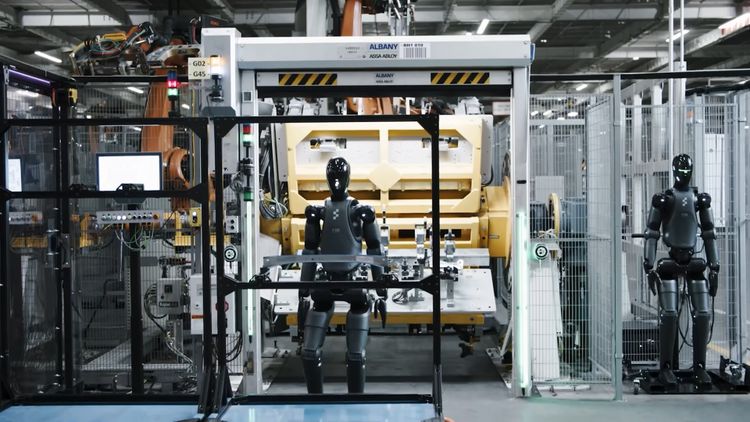
Autonomous robots and cobots (collaborative robots) are machines that work alongside humans on assembly lines and in warehouses. These AI-powered machines use cameras, force sensors, and lidar to read what is happening around them, which can be used for stopping when someone enters their vision, welding parts with precision, or moving inventory around a warehouse. This is often called physical AI, as they act in the real world rather than just on a screen.
Natural Language Processing and AI Agents
Natural Language Processing (NLP) is software that reads and writes human language. Today, that mostly means large language models and chatbots like ChatGPT and Gemini. It lets someone ask a question in plain English and gets answers pulled from a system or database that would otherwise require a human to access. An AI agent is a model that has been given tools and the ability to use them effectively, so it can take actions such as creating a purchase order, sending an email, or updating a record in an ERP.
Use Cases and Applications of AI in Manufacturing
AI for Quality Control
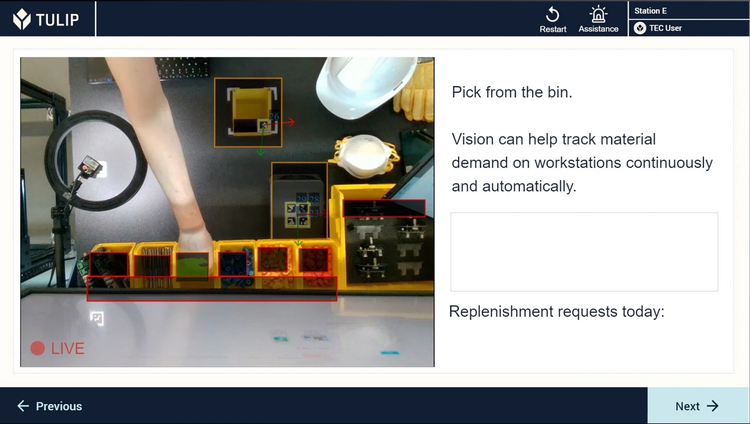
AI quality inspection uses computer vision and cameras to check parts as they are made. It catches surface defects, verifies components against a bill of materials, and reads labels and lot codes for every product on a line.
-
The Problem: Laerdal Medical, a Norwegian manufacturer of CPR and intubation training manikins, moved production to a new facility and needed to prevent incomplete kits from leaving the building. Operators assembled each kit by hand from a long list of parts, and missing components often were not caught until customers filed return claims.
-
How AI Was Used: The team partnered with Tulip a manufacturing operations platform and installed off-the-shelf cameras above each assembly station. As workers picked parts and placed them in a crate, Tulip Vision automatically checked them off the bill of materials, no matter the order they were picked. Each kit gets a photographic record, and Laerdal has assembled thousands of kits with zero defects or omitted parts since the system went live.
-
Limitations to Consider: A vision system only catches what it has been trained to see or not see, and confirming a part is present is far easier than judging if a finished part is acceptable. Expect to retrain models or update workflows if suppliers change packaging or a part gets redesigned.
AI for Maintenance Management
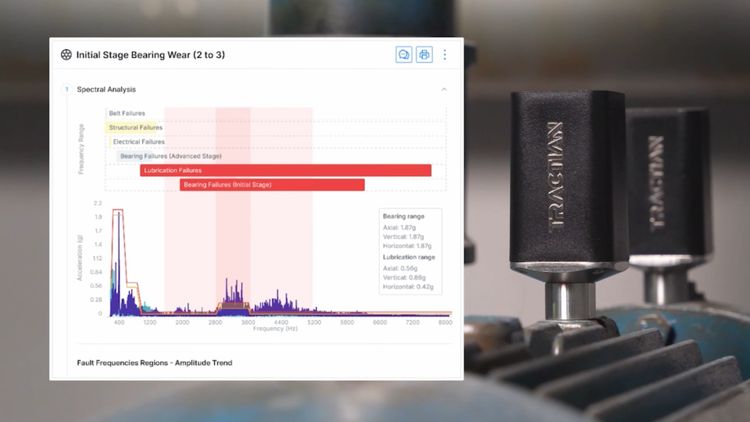
AI in maintenance management uses condition sensors and machine learning to monitor equipment that humans cannot see or hear. It predicts which assets are heading for failure, identifies likely problems, and can delegate maintenance tasks based on its findings.
-
The Problem: Sherwin-Williams, the paint and coatings manufacturer, wanted better predictability on its powder coating lines. Before adopting a solution, production equipment would fail unexpectedly, resulting in unnecessary downtime and costly production line stoppage.
-
How AI Was Used: The company deployed Tractian conditioning monitoring, which mounted proprietary vibration and ultrasonic sensors onto critical equipment on the shop floor. Traction trained its models to identify the signature of a healthy machine, so when a bearing began to fail, the system flagged it, identified the likely issue, and automatically generated a work order. Sherman-Williams and Tractian report that 564 hours of downtime were prevented and $13,000 were directly saved by this initiative.
-
Limitations to Consider: Predictive maintenance and condition monitoring systems can only monitor the equipment on which they are installed. Sensors are often expensive, and models need a baseline of normal operations before they can determine anything useful. Understand the ROI for both software and hardware when adopting AI applications.
AI for Production Scheduling
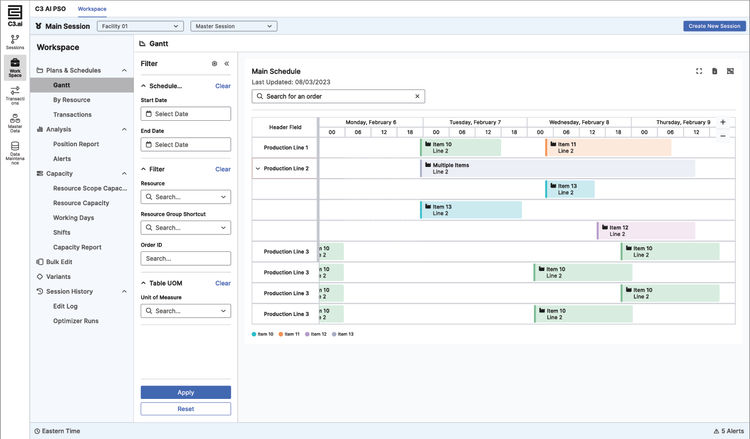
AI production scheduling uses optimization rules and demand forecasting models to build a plan that production lines can actually run. The AI models weigh thousands of competing constraints all at once, rebuild schedules when conditions or weights change, and can test hypothetical scenarios quickly.
-
The Problem: Nucor, the largest steel producer and recycler in North America, wanted more output from the 30+ mills they already owned. Their planners were scheduling production by hand across more than 400 products, and building a single plan took five to seven days of manpower.
-
How AI Was Used: The team partnered with C3 AI, an enterprise AI software company, and consolidated three years of production history from seven separate systems into a single place. The optimizer then used that data and weighed more than 300 variables and constraints against the casting process and built a full production schedule in about an hour. C3 tested it against previous schedules, and the company has since increased net production by roughly 1%, worth more than 1,000 additional tons
-
Limitations to Consider: AI scheduling can only be as good as the data that feeds it. Most manufacturers keep routings, cycle times, inventory, and order history in separate systems that often don’t talk to each other. Expect to consolidate and clean your data before adopting any AI tool or scheduling software. Nucor pulled three years of history out of seven systems before the model could run effectively.
AI for Process Optimization & Digital Twins
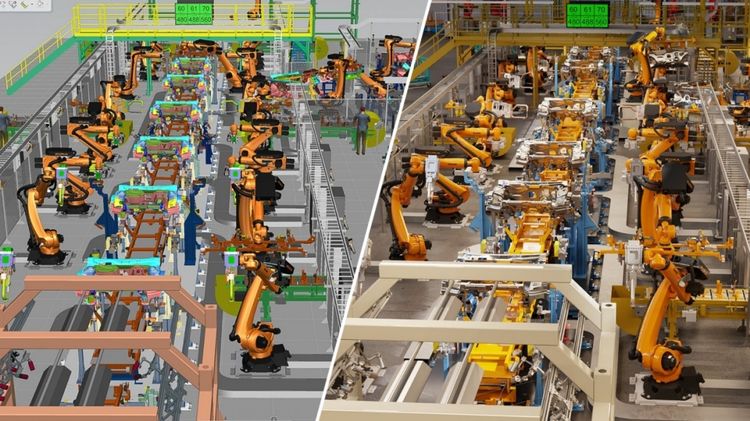
A digital twin is a simulated copy of a machine, factory, or production line that models how processes work and how they can be optimized. Manufacturers use digital twins to test layouts, reduce production inefficiencies, and design better processes on the shop floor without physically moving machines or lines.
-
The Problem: Orphea, a Swiss manufacturer of fabric products, ships millions of treated paper sheets a year, and needed to replace an error-prone human process. While much of the existing production was automated, the final step of sorting and shrink-wrapping products was too delicate for existing machines on the market.
-
How Digital Twins Were Used: Orphea partnered with Vimco, a packaging systems integrator, and Rockwell Automation. Vimco built the entire line as a digital twin in Emulate3D first, testing the motion, control logic, and coordination of every sub-system before a single part was manufactured. With a newly designed production line, Orphea was able to run two different product formats without a changeover and, per a Rockwell Automation case study, merged two separate production lines into one.
-
Limitations to Consider: Most of what gets sold as a digital twin is not AI but rather a simple physics simulation. Emulate3D is not claiming to be an AI-powered tool, nor was AI used to produce the new production line. That said, AI is often used alongside digital twins to train vision models, robot behavior, and catch process irregularities without interfering with the live shop floor.
AI Agents and Copilots
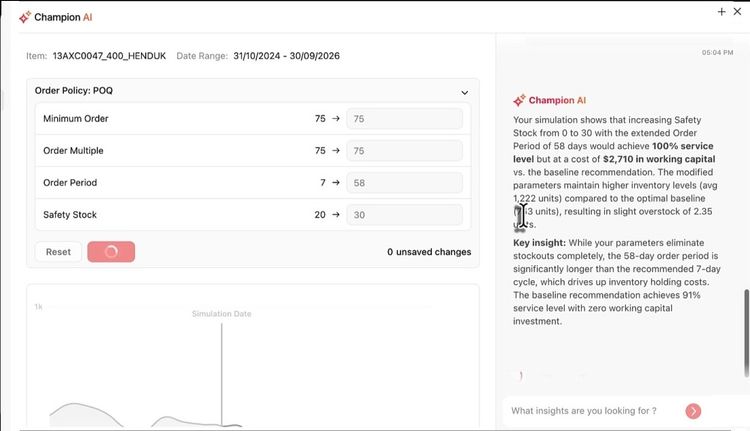
AI agents and copilots work inside or alongside the systems a manufacturer already runs. They answer questions about production data in plain English, handle routine admin work like purchase orders and 3-way matching, and can escalate exceptions to the right employees to make a call.
-
The Problem: Sonic Manufacturing, an electronics manufacturing services provider, processes more than 57,000 purchase order lines across 61 suppliers and needed to keep up without adding more employees. Its existing team of five had to track every confirmation, date change, and shipping document by hand, resulting in repetitive, no-value work.
-
How AI was Used: The Sonic team partnered with QAD, a manufacturing AI and ERP vendor, to use its Procurement Champion Agent, built on Amazon Bedrock. The agent monitors supplier communications, flags exceptions, and pushes validated updates straight into their MRP. Senior buyer Patti Humphreys put it plainly: “It alerts me to my problems instead of me finding them later when I need the part.” According to the QAD write-up of the deployment, Sonic cut manual work by up to 80%, and Patti got back roughly 2 hours a day.
-
Limitations to Consider: AI agents and copilots are only as good as the data they have access to and the humans that operate them. Ensure the systems and data that the agents need to work effectively are available to connect and know exactly what an agent can change on its own before you use it. If the wrong delivery date is pushed to the MRP or a customer promise was made outside of the system, AI agents can cause more problems than they solve.
AI for Warehouse and Logistics
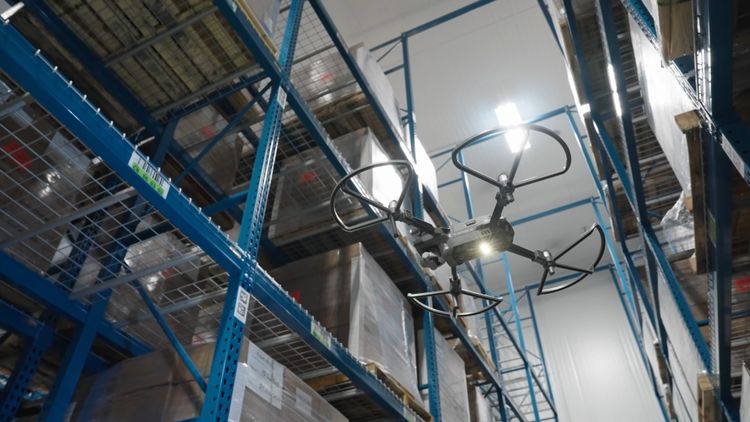
AI used in warehouses and logistics facilities helps manufacturers improve warehouse operations and track inventory and raw materials more effectively. Beyond demand planning and supply chain forecasting, AI can be used to count and locate stock without manual cycle counts, direct pickers through the aisles, and flag gaps between what your WMS says and what is actually in the warehouse.
-
The Problem: GEODIS, a third-party logistics provider, took on a customer who wanted quarterly cycle counts. The company wanted to meet its commitment without adding extra staff, but its four-person counting team was already working overtime and could scan only 800 inventory locations a day.
-
How AI Was Used: GEODIS partnered with Gather AI, a warehouse inventory platform that utilizes vision technology and autonomous drones to track inventory movement. These autonomous drones would fly through each aisle of the warehouse, and the Gather AI vision would read barcodes, lot codes, and case counts on every pallet and flag discrepancies for human review. A single drone operator can now scan over 1,200 locations a day and identify mismatched pallets in minutes, according to Gather AI’s GEODIS case study.
-
Limitations to Consider: AI in the warehouse means you’re buying hardware, not just software. Drones, autonomous robots, and vision systems all add cost and complexity to your existing setup. GEODIS only took this on because a key customer was demanding quarterly cycle counts it could not otherwise hit. Ensure the ROI exceeds the cost of manual labor.
Where AI and Automation Fail
Most AI and automation projects that fail in manufacturing don’t fail because the technology didn’t work.
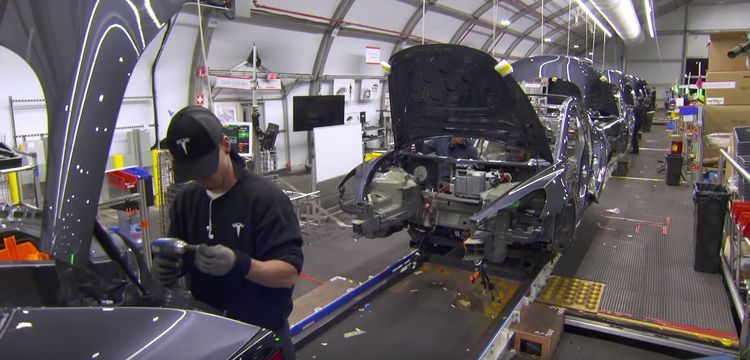
Tesla is a famous example. The plan for the Model 3 line was to automate as much of it as possible and reach a target of 1,500 cars. But by Q3 of 2017, Tesla had only built 260 against its quarterly goal. And by 2018, Elon Musk conceded that excessive automation at Tesla had been a mistake. The company ended up assembling some Model 3s in a tent, largely by hand, and didn’t hit its 5,000-a-week target until July 2018, about seven months late.
Boeing’s version took longer to unwind. The company spent four years on a system called Fuselage Automated Upright Build, which used robots to drill thousands of holes in a 777 fuselage. It was based on a reasonable theory that a machine would be faster and more accurate than a person with a drill. By November 2019, Boeing gave up on the robots and handed the fastening back to its mechanics. If anyone had the budget and the runway to make that work, it was Boeing.
Those are the expensive, public versions. The more common failure is much more subtle and looks like a system doing exactly what it was supposed to do, while nothing actually changes.
We talk to manufacturers evaluating this software every day, and the pattern is the same. New software goes in, expensive sensors get installed, and then the alerts just sit. They don’t sit because they’re wrong. They sit because the line can’t come down this week, or the one person who understood the dashboard has moved on.
The common thread across all three failures is not the technology. Tesla had to put people back on the line. Boeing found its mechanics more reliable than its robots at the job that mattered most. And a plant paying for alerts nobody opens didn’t buy the wrong software; it just never built a process to act on what the software found. The question worth asking before you try AI is not whether the new technology will work. It’s about whether your existing operation can facilitate what the technology will bring.
How to Prepare Your Operation for AI
Get Your Data and Your Team Ready
-
Get your data into one place: AI can’t do much with information spread across spreadsheets, whiteboards, and people’s heads. Every use case on this page runs off a system of record holding clean, current data, whether that’s an ERP, MRP, CMMS, WMS, or historian. Nucor had to pull three years of history out of seven separate systems before its scheduling model could run at all.
-
Write down what normal looks like today: You cannot prove a 6% energy reduction without knowing what you were using before. Baseline the specific metrics the project is meant to improve. Record your OEE, scrap rate, MTBF, schedule adherence, forecast accuracy, and inventory accuracy before adopting any future technology.
-
Confirm the bottleneck: A project can work exactly as designed and still change nothing if the bottleneck was somewhere else. Trace where outputs actually get held up before you scope out any AI project. For example, the problem of customer returns costing your bottom line could be due to many reasons. Understand the core root cause of the problem before committing to anything.
-
Get input from frontline employees: The people who will use the system every day know which problems are real and which ones only look bad on a report. They also know the workarounds that keep the plant running, and none of those are written down anywhere a model can find them. A tool that makes their job harder will never be adopted and can waste thousands in a failed rollout.
-
Define what success looks like: Write down the metric that has to move, how far, and by when, before anyone signs anything. An MIT-affiliated study found only about 20% of enterprise AI systems make it past pilot and only about 5% reach production, and the difference is usually that no one defined up front what “working” meant.
-
Establish a realistic budget: Software projects have a long history of running through budgets and taking 2x as long, as ERP implementation failures repeatedly show, and AI is no different. Integrations, data cleanup, and internal change management can bleed project budgets quickly if not scoped before they start. Be sure to set a clear ceiling before you start demos and make sure every provider understands the number is firm.
How to Evaluate AI Vendors
-
Ask what the AI actually is: A fair amount of what gets sold as AI is statistical modeling or automated workflows with a fancy new interface. Ask what the model was trained on, ask what it does when it encounters something it hasn’t seen before, and understand its limits for hallucinations and errors.
-
Demo on your data: Vendor demos often run on clean data chosen to make the product look good. Ask them to run it against a small slice of your own data, ideally one you know is an edge case and see how it can handle the records that do not fit the stock demonstration.
-
Run a small pilot: Pick one production line or a small team to pilot the project. Give the project time to get through the initial learning curve and determine if the investment is worth the return. If a small project with limited team access cannot work, there is little chance this initiative can scale to the entire company.
-
Ask who owns the data and outcomes: Find out who owns the data you feed into the system, who owns the model trained on that data, and whether you can take either with you. It is also important to understand if your data is being used to train models that other customers, including your competitors, will benefit from. Get the answers in writing before signing, because this rarely comes up until renewal, and by then, you have no leverage.
Working out which vendors are worth a demo takes weeks. We have been helping manufacturers find the right software for over 25 years, and can point you in the right direction. Just tell us what you are trying to solve and we will point you at the tools worth your time.

