

OpenGov
2 Reviews 5/5 ★ ★ ★ ★ ★A cloud-based software suite for local and state governments. OpenGov covers finance, budgeting, procurement, HR, permitting, asset management, utility billing, and 311 requests, with every product sharing data on one platform.
Product Overview
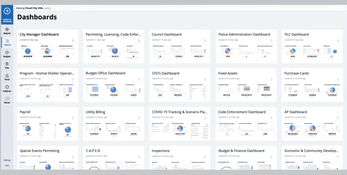
OpenGov is a cloud-based software suite for local and state governments, which the company calls the Public Service Platform. It covers financial management, budgeting, procurement, HR and payroll, grants, permitting and licensing, asset management for public works, utility billing, tax collection, and resident services like 311 requests. Agencies can buy individual products or combine several, and every product shares data on one platform. OpenGov’s AI assistant, OG Assist, works across the suite.Pros
- Covers finance, permitting, and public works
- Products share data on one platform
- Agencies can buy single products or combine several
Cons
- No public pricing
- Cloud-only deployment
- Frequent updates require staff retraining
Target Market
Cities, counties, state agencies, school districts, and special districts that want cloud software for finance, permitting, or public works.Not Recommended For
Private-sector businesses or agencies that require on-premises hosting.Key Features
- Financial Management: A fund accounting general ledger designed around GASB standards, with a single chart of accounts, real-time posting from other modules, and audit trails turned on by default.
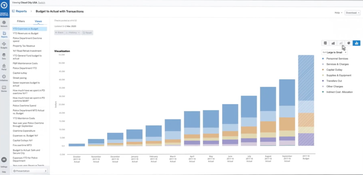
- Budgeting & Performance: Operating budgets, workforce cost modeling, performance tracking, and online budget books in one system.
- Capital Budget & Project Management: Builds 5- to 15-year capital plans with priority scoring, then tracks project spending against estimates.
- Procurement & Contract Management: Covers the full process from purchase request to contract, with a solicitation builder, automated bid tabulation, e-signatures, and a free vendor portal.
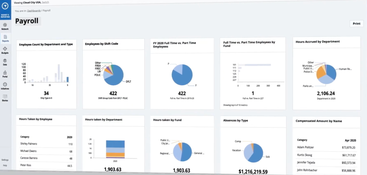
- Human Capital Management & Payroll: Handles position control, civil service recruiting, benefits enrollment, and compliance workflows, and posts labor costs to the correct fund.
- Grants Management: Tracks awards, disbursements, sub-recipients, and close-out, with deadline alerts and version history for audits.
- Tax & Revenue Collection: Manages property, business, sales, lodging, and other local taxes, along with cashiering, online payments, and delinquency tracking.
- Utility Billing: Bills for water, sewer, stormwater, and trash, with tiered and seasonal rates, meter reading, and a resident payment portal.
- Permitting & Licensing: Accepts permit and business license applications online, flags missing information before submission, and manages plan review, inspections, and code enforcement cases.
- Enterprise Asset Management: Tracks infrastructure assets and work orders with built-in GIS mapping, preventive maintenance scheduling, and a mobile app for field crews.
- 311 Request Management: Lets residents report issues through a portal or app with photos and map pins, routes requests automatically, and can turn them into asset management work orders.
- OG Assist: An AI assistant that flags miscoded transactions before they post, reads invoices to fill in fields, and drafts budget narratives.
Pricing
OpenGov doesn’t publish pricing. Agencies get quotes through a sales demo or through cooperative purchasing contracts. OpenGov’s customer agreements bill software as an annual fee paid in advance, and implementation is billed separately as a professional services fee, typically used within the first year.
Product Overview
Developer Overview


User Reviews of OpenGov
Write a Review
OpenGov Review
When folks from outside the city are looking at the decision we’ve made in the last couple years and our outlook, two things they are looking for are, 1) “how are you going to manage the federal stimulus?” and 2) “how are you projecting your revenues?”
Using OpenGov, we’re able to make a detailed 5 year projection for our revenues and pair that with a 5-year projection for costs. Using that information allows to not only look at the year we’re budgeting for, but also a 5 year window and make really smart decisions with our budget.
Using this budget not just for the annual budget that we are formerly appropriating, but for all of the years in our forecast gives us a much more accurate forecast and a better understanding of the story of our budget.
Much of my career since going to grad school has been in public finance, and I’ve found that when working in public policy, when you get down to the budgets, that’s where the rubber really hits the road.
For each program that we have at the city, we make sure departments are including not only information about what they’re doing, what kind of services they’re providing, but also, how it’s impacting racial equity in the city of Minneapolis and how it connects to the city’s strategic plan around racial equity.
Our departments are looking at data to see, “is that data disaggregated by race?” and “are we really doing the best we can to take a look at how will new investments impact marginalized groups in the city?”
The control that we have over it as non-communications professionals, to be able to say we have an important story to tell about our community development department or our civil rights department.
We are following our own financial policies. We are keeping our reserves where they need to be. And we are managing in a holistic way, making sure that our city is prepared for the future.
OpenGov Review
We were given the direction from our leadership that this needed to happen sooner rather than later.
Being able to build [the process] out ourselves prior to going live really helped us understand how the software works, and [how to] make it work for us and automate as much as possible. It has made it quite simple.
