

Best ERP Alternatives
The best ERP alternatives for growing and enterprise businesses. Find options from open-source software to AI-native platforms to achieve the scale of an ERP without the weight of a full enterprise suite.
The best ERP alternatives give you the financial and operational tools of a full ERP without the six-figure cost, long rollout, and features you will never use. ERP software is not dead, but the idea that every growing company needs one large, all-encompassing suite is no longer the norm.
To help you find the best software, we tested, reviewed, and demoed several top ERP alternatives worth considering in 2026 using our advanced review methodology. Below are our top picks covering open-source and cloud systems, modern AI platforms, and lightweight best-of-breed tools for teams not ready to commit to a full system.
Quick List
| Software | Best for | Complexity | Time to implement |
|---|---|---|---|
| Odoo | Open-source ERP alternative | Moderate to high | 1–6 months |
| Acumatica | Growing businesses | Moderate | 3–6 months |
| QuickBooks Enterprise | QuickBooks users | Low | Days to weeks |
| Rillet | Finance teams | Low to moderate | 4–10 weeks |
| Campfire | Startups and SaaS | Low to moderate | 4-10 weeks |
| Doss | Product-based businesses | Moderate | Weeks to months |
| Tangle | Manufacturers | Low to moderate | Weeks to months |
| Digit | Inventory and production tracking | Low | Weeks to months |
What ERP Software Is (And Who It’s For)
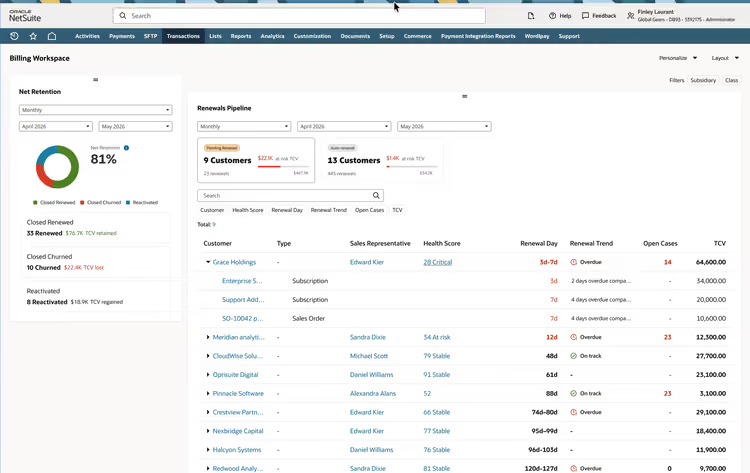
Before you weigh alternatives, it helps to be clear on what an ERP actually does and who it was built for.
ERP Overview
ERP software, short for enterprise resource planning, is a software system built for enterprises to consolidate core business functions into one shared database. They support workflows across accounting, inventory, procurement, supply chain, HR, and sales from a single platform, eliminating the need for multiple disparate systems. ERP software was built to help companies standardize how work gets done and ensure that every department works from the same set of numbers.
Companies that Typically Use ERP Software
Traditionally, ERPs were designed for mid-market to large global companies operating in product-heavy industries such as manufacturing, distribution, and retail. Often, these companies need inventory, production, finance, and operations to stay in sync with each other. Other times, organizations need to standardize how the business operates at scale across multiple entities, departments, or locations. Most companies do not start with an ERP but rather migrate to one when spreadsheets and entry-level accounting systems no longer meet their needs.
Where ERP Software Has Limitations
While ERPs are powerful systems that completely change how a company operates, they come with many limitations. First, a full implementation is costly and often exceeds six figures for complex roll-outs. Secondly, ERP implementations take many months to years to complete, which can slow productivity and disrupt normal business functions. Lastly, because most ERP software is built to be configured rather than used out of the box, many companies rely on expensive consultants or hire a dedicated team to run it well.
Why Look at ERP Alternatives?
Businesses looking for ERP alternatives usually fall into one of three camps:
-
The company has outgrown entry-level accounting systems like QuickBooks or Xero, and needs a more structured way to operate than what spreadsheets can provide.
-
The company has tried to purchase a traditional ERP and found the cost and implementation timeframe prohibitive.
-
The company is using a traditional ERP but it no longer fits the business operations or is too rigid to adapt to changes.
While there is no single reason a business might want to explore an ERP alternative, these categories reflect the sentiments of the companies we regularly talk to.
Best ERP Alternatives (In-depth Comparison)
Odoo - Best Open-Source ERP Alternative
Product Overview: Odoo is an open-source platform with a catalog of prebuilt modules that you run independently or as one integrated ERP. It offers a free, self-hosted community edition with paid cloud tiers that let you start small and grow into it.
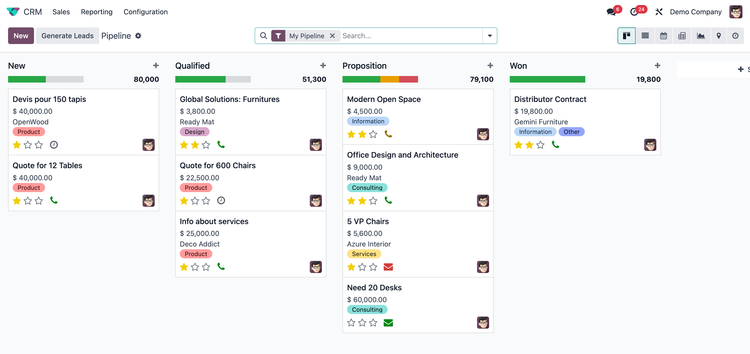
Core Features: The platform offers core ERP functionality covering accounting, inventory, sales, CRM, basic manufacturing, and eCommerce in one connected system. It features an easy-to-use Studio app that lets you personalize screens and workflows without heavy IT development. Odoo also lets businesses customize the source code, allowing for deep configuration and custom applications.
Limitations: Odoos’ strength is also its weakness. While it covers a wide range of features and industries, it can seem limited in depth when compared to industry-specific ERPs like SAP or Infor. Support is also a hit-or-miss, depending on the partner you enlist to implement the platform.
Best for: Small and growing businesses across professional services, manufacturing, eCommerce, distribution, and retail.
To learn more, see our full Odoo review.
Acumatica - Best Cloud ERP Alternative
Product Overview: Acumatica was built for small to mid-market companies where operations drive the business, not just finance. It offers a unique pricing model compared to traditional ERPs. Instead of a per-seat model, you pay based on how much the system actually processes. Transaction volume and computing resources determine the cost, not user count.
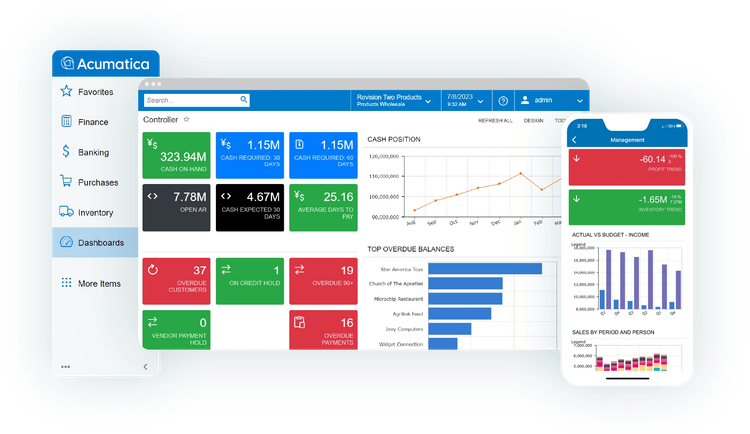
Core Features: The software offers various product editions depending on your industry. You can choose from the distribution, manufacturing, construction, retail, or professional services edition. Each package comes with purpose-built workflows, but all share the same core finance module. Acumatica can be deployed through a public cloud, a private cloud, or on your own servers.
Limitations: While the system handles operational workflows well, its finance module is limited. It does exactly what it needs to, but if you need more advanced accounting or consolidation, explore systems like Campfire and Rillet.
Best for: Distributors, manufacturers, contractors, and other verticals where operations like warehouse and production management matter as much as back office finances.
Read our full review on Acumatica.
QuickBooks Enterprise - Best for QuickBooks Users
Product Overview: QuickBooks Enterprise is Intuit’s most capable product in the QuickBooks product line and the closest thing Intuit offers to an operational ERP. It is built for growing small businesses that have outgrown QuickBooks, usually in the range of 10 to 40 employees. It offers both on-premise and cloud-based solutions for organizations that need flexibility.
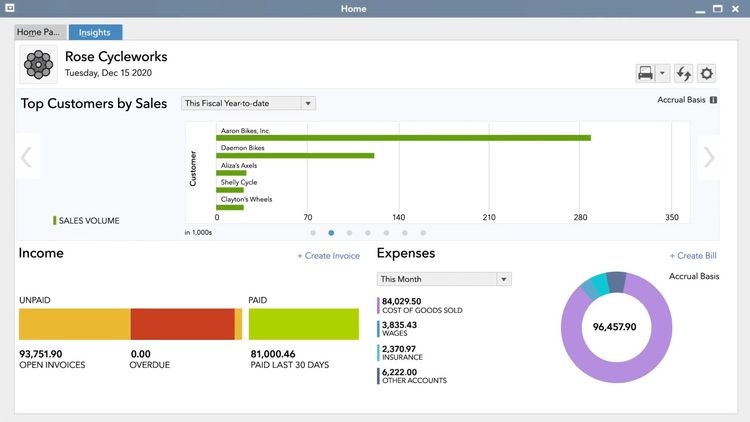
Core Features: The enterprise platform offers an older QuickBooks look and feel but still provides core accounting, multi-location support, and Advanced Inventory management beyond what QuickBooks Online can provide. It adds barcode scanning, bin and lot tracking, multi-warehouse management, and includes Advanced Reporting that gives finance and operational teams more control over their inventory and books. It also includes assembly and BOM management, which are critical for tracking manufacturing inventory.
Limitations: QuickBooks Enterprise has a more dated interface than the online versions. It was built for small businesses and does not support enterprise-level manufacturing or complex operational workflows. Intuit is also notorious for costly price hikes while offering little to no benefit to the end user. This product only supports up to 40 users.
Best for: Established QuickBooks users, especially field-service businesses and product-based companies with smaller teams who are not ready for a full ERP implementation.
Explore our deep dive into QuickBooks Enterprise.
Rillet - Best AI-Alternative for Finance Teams
Product Overview: Rillet is an AI-native finance and ERP platform that was built around accounting, not operations. It automates the month-end close for companies with complex finances by drafting journal entries, revenue schedules, and account reconciliations from your source documents. It often replaces legacy ERP systems such as NetSuite and Sage Intacct.
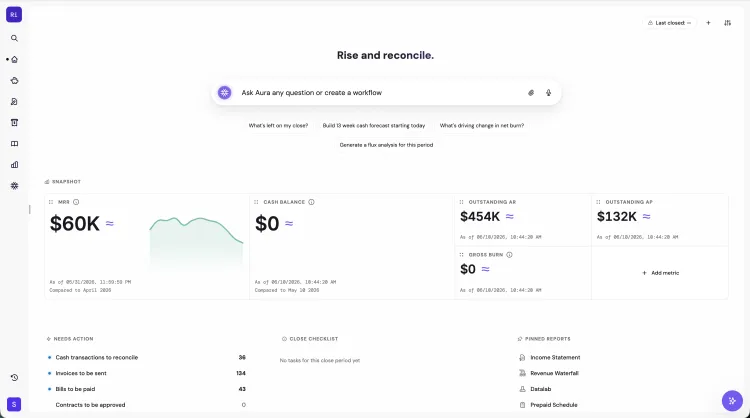
Core Features: The software handles multi-entity and multi-currency accounting, advanced revenue reconciliation, and real-time reporting that surfaces key metrics such as ARR and runway. It features an AI assistant that handles much of the manual month-end close, allowing finance teams to work more efficiently and focus on strategy rather than busywork. And it has no per-seat pricing, allowing for unlimited finance users.
Limitations: Rillet is strictly focused on finance; it does not cover inventory, manufacturing, or operations, so a product-based business will still require a system for warehouse or shop-floor management. It often requires integrations with other systems on this list, such as Doss or Tangle.
Best for: Finance teams of service-based businesses, SaaS and technology companies, and other operation-light organizations with complex finances looking to move off a legacy ERP.
Campfire - Best for Startups and Software Companies
Product Overview: Campfire is also an AI-native finance and ERP platform built for complex finances and revenue recognition. It pairs a modern general ledger with an AI assistant that handles routine reconciliations and speeds up the month-end close for mid-market companies that have outgrown QuickBooks but do not want a heavy ERP.
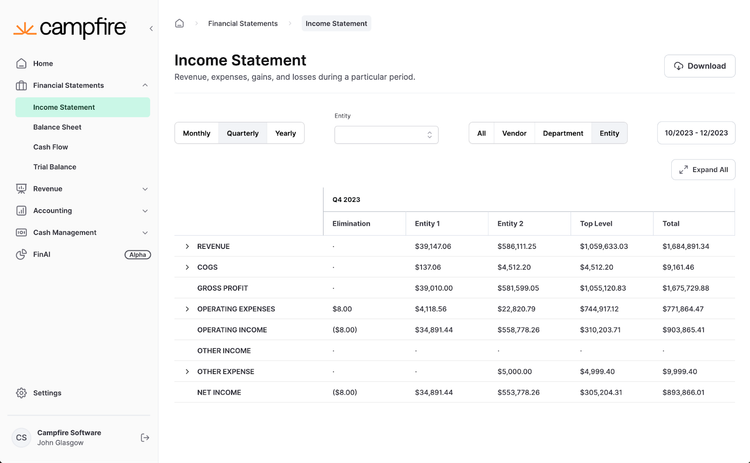
Core Features: The platform covers core financials, including a general ledger, revenue automation, multi-entity consolidation, and a large-language accounting model designed to eliminate manual work for finance teams. It features a modern interface with easy-to-use drag-and-drop reports for high-growth teams that need clean books and investor-ready reporting as they scale.
Limitations: Like Rillet, Campfire is finance-only; it has no inventory, manufacturing, or field service support. It is also very young, and some users may find the reporting and customization still maturing.
Best for: Venture-backed startups, SaaS companies, and fast-growing businesses with unique revenue models that need core accounting without a full suite.
Doss - Best for Product-Based Businesses
Product Overview: Doss is an adaptive, AI-native operations platform for companies that live and die by the products they make and the inventory they hold. It connects inventory, orders, purchasing, and finance into one streamlined system that can be shaped exactly to how a business is run in as little as a few weeks.
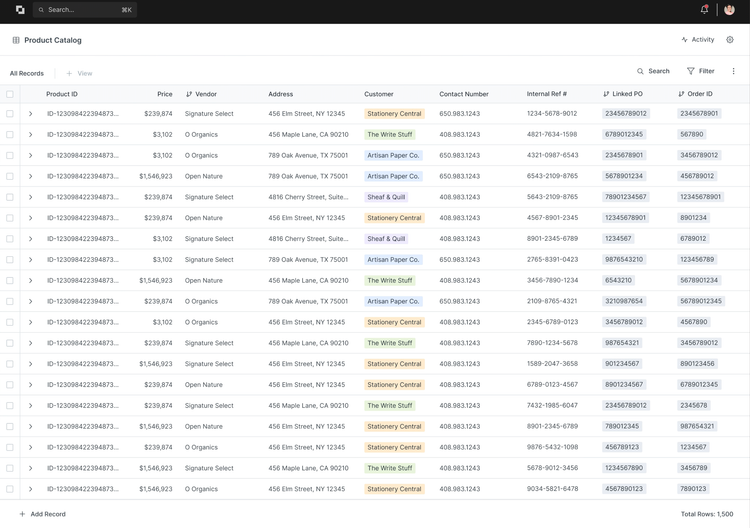
Core Features: The software is built to handle every aspect of a shop floor, warehouse, or distribution center. It integrates deeply with existing accounting software and features a no-code setup that lets companies tailor the system and get up and running in as little as a few weeks to a few months. It also allows organizations to build the platform exactly as they operate, reducing the configuration issues that plague legacy “best-practice” ERPs such as NetSuite and SAP.
Limitations: Doss is built for operations, so its financial capabilities are weaker than those of accounting-focused systems like Sage, Campfire, and Rillet and you will require an integration for most deployments.
Best for: Consumer packaged goods (CPG), brands, and other product-based companies in food and beverage, beauty, and apparel that need a flexible operational platform.
Tangle - Best for Manufacturers
Product Overview: Tangle is a newer ERP and manufacturing software built to be more flexible than legacy ERPs. Rather than offering a fixed template that the business has to mold itself to, Tangle assembles the system around how production is already run. It is a cloud-based software built to be up and running quickly
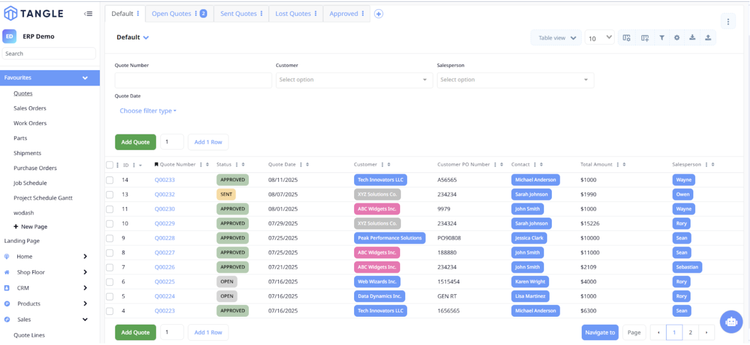
Core Features: Features one customizable platform for managing production, inventory, purchasing, and manufacturing operations. It covers custom quoting and order management, work orders, shop floor tracking, lot traceability, and capacity planning. The software is extremely customizable with Milo, an AI-powered builder that is used to create custom apps, screens, workflows, and automations around how shop floors are actually run.
Limitations: The platform does not have its own accounting module and requires integration with systems like QuickBooks, Sage, or Xero. This can be limiting for teams looking for a single system to run finance and operations. It also has a smaller customer base than traditional ERPs as it’s a newer vendor.
Best for: Small and midsize discrete and custom manufacturers, from job shops to metal fabrication and medical device companies.
Digit ERP - Best for Inventory and Production Tracking
Product Overview: Digit is an operations platform for manufacturers and distributors that stops short of being a full ERP. It sits on top of a company’s existing accounting system and runs the physical side of the business, getting organizations up and running in as little as a few weeks.
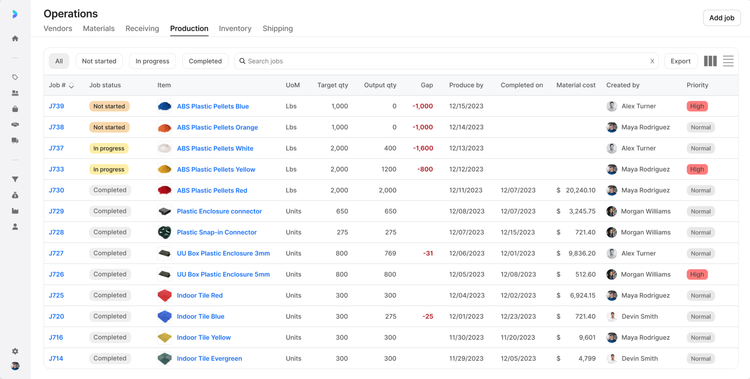
Core Features: The software covers inventory, warehouse management, production, BOM management, MRP, and procurement. Because it integrates with leading accounting platforms, it provides an ERP-like experience at a fraction of the cost and time of a full ERP rollout. It features deep integrations with platforms like QuickBooks, Xero, and NetSuite
Limitations: With no general ledger on its own, Digit requires purchasing a separate accounting software. It is also a newer product that is still being developed and new features are less mature when compared to legacy systems like Infor.
Best for: Small and growing manufacturers and makers who need strong inventory and production tracking without leaving their existing accounting software.
Best ERP Alternatives by Company Size
The right fit software depends as much on your size as your industry. Here is how these 8 alternatives fit based on company size.
Growing Business
- Odoo: A very low cost to enter with a free edition to test out one app. Can build out the platform as business needs expand, but customizations can be costly.
- QuickBooks Enterprise: The natural next step for a small business already on QuickBooks that needs more users, deeper inventory, and better reporting.
- Tangle: An ERP alternative for small and growing manufacturers that can completely replace the need for a full ERP suite. Great for small businesses looking for the power of an ERP without the IT team to run it.
- Digit: A small shop can modernize inventory and production tracking while keeping the accounting software it already uses, offering an easy transition compared to an ERP.
Mid-Market & Enteprise
- Acumatica: A finance and operational platform with resource-based pricing that lets a growing company add more users without watching license costs climb.
- Rillet: A finance-first platform for mid-market finance teams to automate the month-end close and replace slow legacy systems like NetSuite.
- Campfire: An enterprise accounting and revenue recognition platform for fast-growing SaaS or startups that need investor-ready books without a full suite.
- Doss: An adaptable operations platform for growing product-based businesses and CPG brands to manage complex inventory, orders, and purchasing work.
How to Choose an ERP Alternative
The right pick depends on how each option aligns with your budget, your team, and the pain points your business aims to solve. A few things to weigh:
Cost and Pricing Model
Look past the sticker price to see how you are charged. Some tools are priced per user, some by usage or resources, and others a mix of both. Per-user pricing can climb fast as you add people, while usage-based or flat pricing is easier to predict. Also, factor in implementation and support, which often cost more than the software itself.
Implementation Time and Effort
A lighter alternative can be live in days or weeks, while a full system can take months and a dedicated team. Be honest about who will run the setup internally and whether the business can absorb a rollout that spans a quarter or more.
What You Need It to Do
Sort your needs into finance-heavy or operations-heavy. If the pain is running the books, completing the month-end close, or reporting, you might want to consider a finance-first platform. If your needs extend to inventory tracking, production scheduling, or better order management, you want something built to handle the operational side of your business. Few tools do both equally well, so lead the search with your main need.
Deployment and Ownership
Decide whether you want a cloud product the vendor runs, an on-premise system you host internally, or an open-source option you can fully control and customize. While open-source software can help lower licensing costs, it usually requires much more setup and ongoing maintenance for your team.
Integrations and Multi-Entity Needs
Check that it integrates with the tools you already use, especially your accounting system, if the platform does not include one. If you operate across multiple entities, currencies, or locations, confirm that support is built in or requires customization or additional purchases.
Vendor Maturity
Newer, AI-native platforms move fast and can get you up and running quickly, but many are young, with shorter track records and quote-only pricing. Weigh that against how proven your system of record needs to be, and ask for references from companies in your industry or vertical.
When ERP is Still the Right Choice
An alternative to ERP is not always the right answer. While the costs and implementation might be daunting, a full ERP still earns its keep once your operations outgrow what a basic system can hold together.
This usually looks like one of the following:
- The company runs multiple entities, currencies, and operates across countries, and needs them consolidated in one place.
- Finance, operations, supply chain, and HR all must work from the same system, where integrations pose more of a risk than the cost of implementation.
- The industry a company operates in is heavily regulated and has strict compliance or traceability requirements that a lighter tool cannot fully cover.
- The business has the budget, timeline, and internal staff to complete a full ERP implementation.
While these alternatives are great options for moving fast, cutting costs, and achieving greater flexibility, if this is where the business is headed over the next 5-10 years, a full ERP should still be strongly considered. Explore our best ERP software guide that covers systems built for that scale.

