Dynamics 365 Business Central vs. Odoo

-
Price Range
$ $ $ $ $$ $ $ $ $
- Starting Price Free
- Client OS iOS, Android, Web
-
Price Range
$ $ $ $ $$ $ $ $ $
- Starting Price $80/user/month
- Client OS Web
Our editorial team tested the demo version of Odoo and the free trial of Microsoft Dynamics 365 Business Central. After an in-depth analysis of their features, pricing, usability, and target markets, we’ve reviewed both ERP systems to draft this comparison.
Scope and Complexity
A light ERP system like Odoo is highly modular, allowing users to start with one app and add more in a piecemeal fashion as their operations expand. It best suits smaller companies with simpler needs, providing basic functionalities for a low cost and simpler implementation.
In contrast, a full-fledged ERP like Microsoft Dynamics 365 Business Central targets larger organizations with more complex operations. It’s a complete system with features like financial management and supply chain operations baked in from the start. However, it’s more expensive, and implementation is more complicated.
Usability
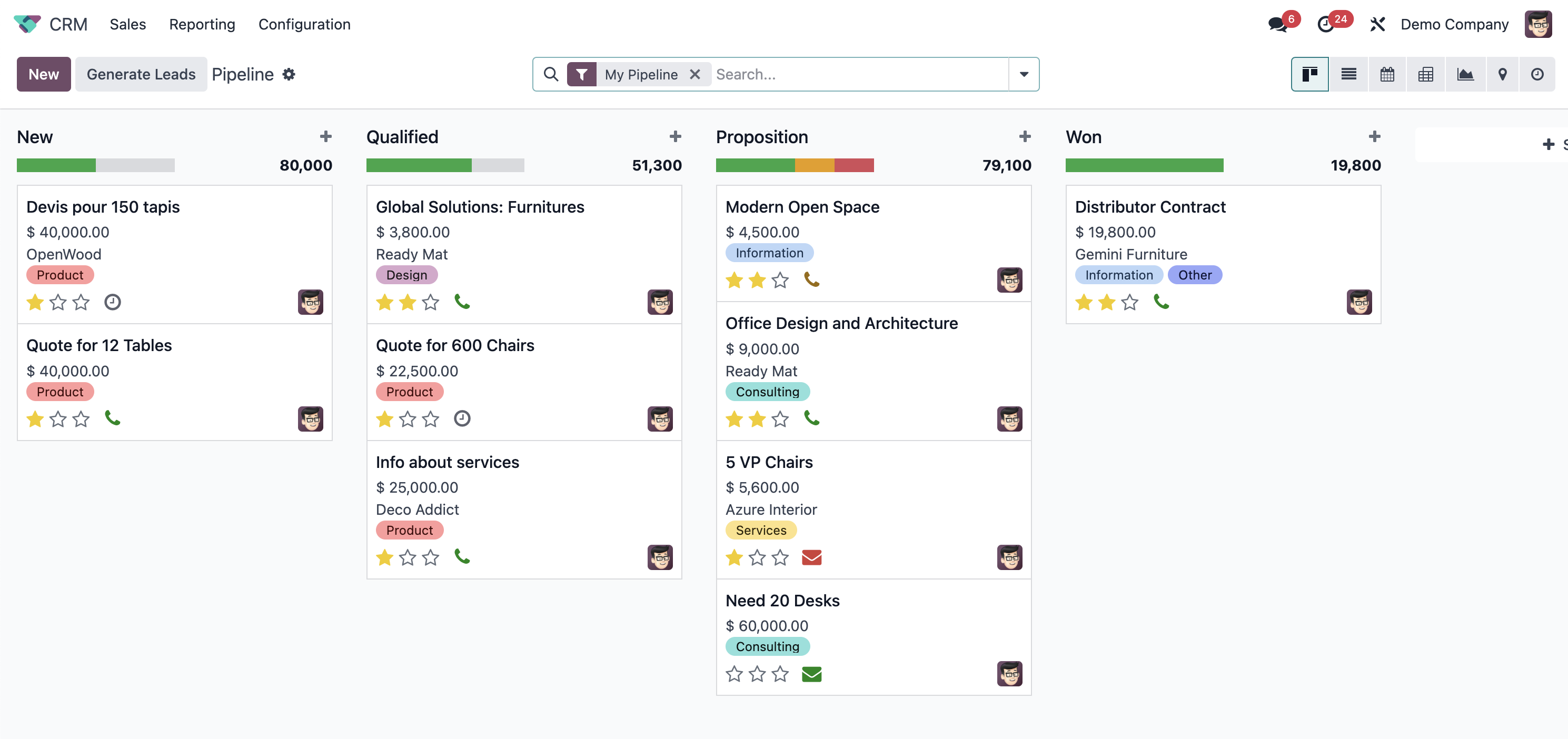
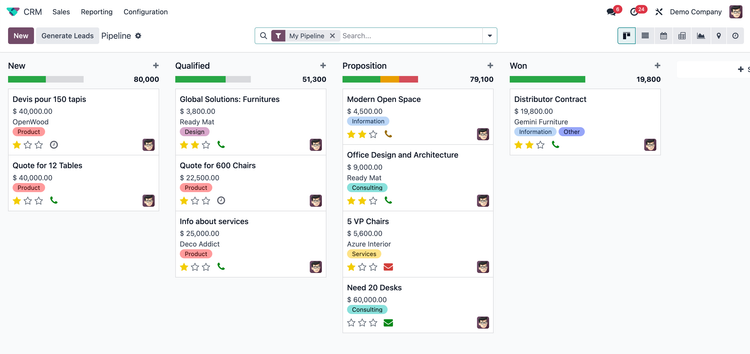
Odoo opens to a home screen of app icons, and most workflows are visual. In the CRM, you drag a deal from Qualified to Proposition, or move a sales order from Quoted to Confirmed, all with kanban-style boards and list views. It feels like the modern SaaS tools most teams already use. If your staff lives in something lightweight like QuickBooks Online, the learning curve is gentle.
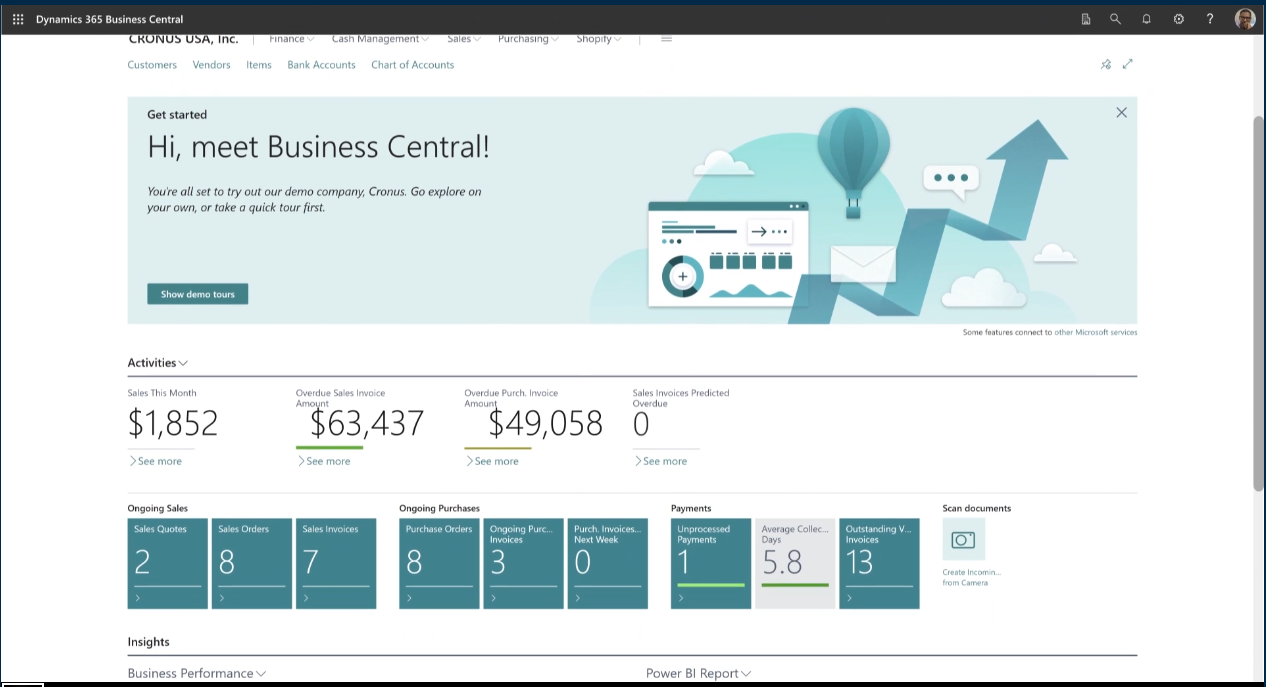
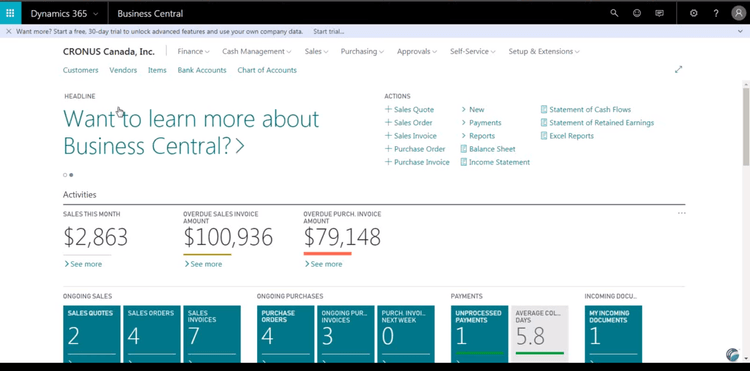
Business Central opens to a “role center,” a home screen built around a specific job. An accountant sees overdue payments and cash balances; a manufacturing manager sees production orders and operations. Power BI charts sit directly in the home view. The interface is denser and more list-driven, and it feels familiar to teams already working in Excel and Outlook.
Features
| Feature Category | Odoo Features | Microsoft Dynamics 365 Business Central Features |
|---|---|---|
| Open Source | Fully open-source | Proprietary software |
| Pricing Flexibility | Pay per module, customizable pricing | Subscription-based, generally per user |
| Community Support | Strong community support with online discussions | Extensive partner network, but less community-driven |
| Deployment Options | Flexible deployment (cloud, on-premises, hybrid) | Mostly cloud-based with on-premises options available |
| eCommerce Integration | Offers native eCommerce module | Requires third-party solutions or additional licenses |
| App Market | Over 10,000 apps available on Odoo App Store | Over 5,000 apps available on AppSource |
| AI and Machine Learning | Limited AI/ML capabilities, mostly through integrations | Native AI capabilities with integration into Microsoft ecosystem (e.g., AI Builder) |
| Integration with Microsoft Products | No native integration with Microsoft products | Integrates with Microsoft 365, Teams, Power BI, etc. |
| Financial Management | Features general ledger, accounts receivable and payable, bank reconciliation, asset management, budgeting | Includes general ledger with dimensions, accounts receivable and payable, bank account management and reconciliation, fixed asset management, cost accounting |
| Manufacturing | Offers bill of materials, maintenance management, work orders, quality control, MRP | Supports agile manufacturing, supply and capacity planning, version management, production orders |
| CRM Capabilities | Supports lead and contact management, opportunity tracking, quotations and orders, sales team performance tracking | Includes contact and opportunity management, sales order processing, sales forecasting, integrates with Dynamics 365 Sales |
Pricing
Odoo’s pricing is fairly flexible for small businesses, with a free One App plan providing unlimited user access to a single module. For broader access to all apps and Odoo Online, the Standard plan is $31.10/user/month (billed annually) or $38.90/user/month (monthly billing). The Custom plan runs $61/user/month (US, billed annually) and adds multi-company support, analytics, Odoo Studio, and on-premise or Odoo.sh deployment. Multi-year commitments lower the rate.
Business Central follows a more traditional model. The Essentials plan is $80/user/month with core CRM, accounting, and supply chain features. The Premium plan is $110/user/month, adding manufacturing and service management. A Team Members plan is available at $8/user/month for limited access, though most companies need Essentials or Premium.
But the bigger number for both is implementation. Deploying either through a certified partner adds real cost on top of licensing. Business Central partner work runs roughly $25,000 to $100,000 for a small business and more for mid-market. In year one, a 10-person Odoo setup is typically 30-60% cheaper; by year three the gap narrows, and which wins depends on your path. Odoo’s risk is customization debt, since every upgrade means revisiting custom code, and community add-ons can fall behind. Business Central’s risk is the opposite: per-user fees that recur every year, however you grow.
Key Differences
- Odoo provides a free plan with more affordable pricing for smaller businesses.
- Dynamics 365 includes an extensive feature set at a higher cost, ideal for larger companies.
- Odoo’s plans increase in cost with complexity and deployment flexibility; Dynamics 365 is more expensive with a straightforward pricing structure.
- Licensing is only part of the story; implementation and ongoing upgrade work often decide the real total cost.
Dynamics 365 Business Central vs. Odoo: Which One is Right for Your Business?
For most businesses, we recommend Odoo over Microsoft Dynamics 365 Business Central. While both are effective ERP solutions, Odoo’s free community version, heavy customization options, and double-entry inventory system put it ahead. It’s also generally less expensive than Dynamics 365, making it more accessible for smaller businesses.
However, if your business is deeply integrated with the Microsoft suite and you need seamless compatibility, Dynamics 365 Business Central can be a strong choice. It also has a familiar interface for anyone accustomed to Microsoft Word and Outlook, which can reduce the learning curve.
For a more comprehensive view of available options, check out our roundup of the best ERP software.