

OneBill FSM360
A field service management software for HVAC, trades, appliance repair, and pest control teams with same-day invoicing and inventory tracking.
Product Overview
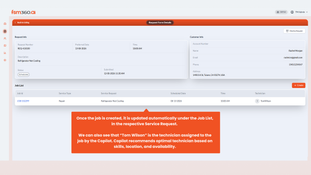
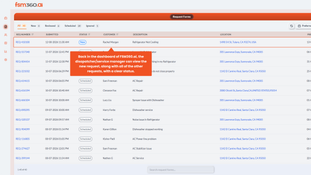
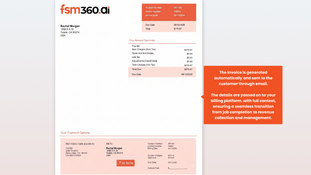
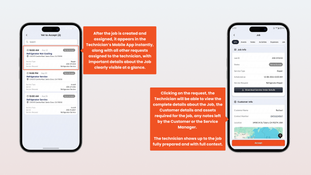
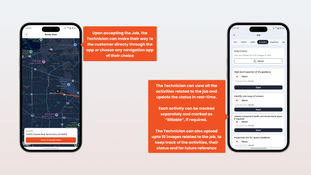
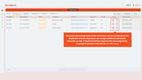
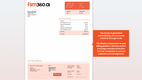
FSM360 is a cloud-based field service management platform for small and mid-sized field operations. It connects dispatch, scheduling, technicians, customers, and billing into a single streamlined workflow. Through the FSM360 mobile app, technicians can view the full customer history and parts availability on hand before arriving, so work gets done right the first time. And with OneBills intuitive billing engine, jobs are billed automatically when marked complete with no manual follow-up needed.
FSM360 also comes with inventory tracking, eSignatures, and QuickBooks integration to help growing field crews spend less time on paperwork and more time on the job.
Pros
- Automatic invoicing on job completion
- Built-in parts and inventory tracking
- Mobile app for field crew to view customer history
- Prebuilt QuickBooks Integration
Cons
- Pricing details unavailable without a quote
- Mobile app only for field techs
Target Market
Field service businesses with 3 to 50 technicians in recurring-service trades like appliance repair, HVAC, lawn care, pest control, electrical, and similar trades. A great fit for service businesses struggling with billing and dispatching.Not Recommended For
Solo contractors who don’t need dispatch coordination, large multi-region operations, and businesses doing project-based installs rather than recurring service visits.Video Overview
Key Features
Dispatch and Scheduling
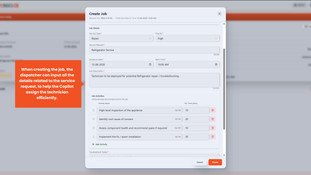
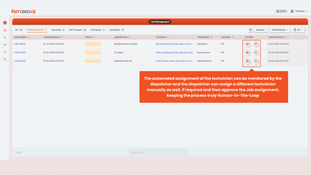
- AI-powered dispatching that recommends a technician based on skills, location, availability, and parts on hand. A dispatcher still confirms every assignment.
- Real-time GPS tracking and workload balancing for technicians and field teams.
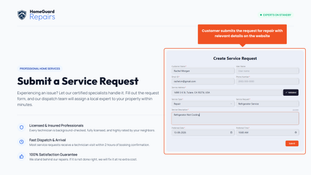
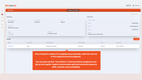
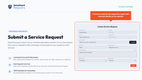
- Customer self-scheduling portal, online appointment booking, and automated customer job status updates.
Job and Work Order Management
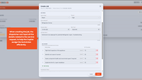
- Create work orders for installations, repairs, and preventive maintenance. Can be automatically generated from billing events.
- Track jobs from initial work order creation through final completion and billing.
- View full customer history, including past jobs, account standing, and billing records.
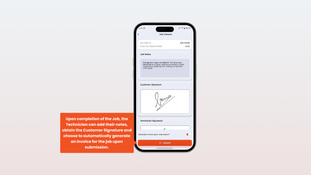
- eSignature capture for approvals and job sign-off.
Inventory Management
- Parts and equipment tracked across technician vans, warehouses, and jobsites.
- Automatically reserve parts when a job is created.
- Stock-level alerts and automatic replenishment triggers can be enabled.
- Parts availability available for both office staff and field technicians.
Invoicing and Payments
- Invoices are generated automatically when a technician marks a job complete.
- Payment processing through built-in payment gateway connections.
- Monthly and annual subscription billing for recurring service contracts.
- QuickBooks integration for syncing invoices and payments to back office accounting.
Technician Mobile App
- Native IOS mobile app for field technicians.
- Offline mode for jobs in areas with poor connection.
- View customers’ job history and look up parts availability anytime.
- Mark jobs complete, and get the customer’s sign-off from the app.
Reporting & Analytics
- Dashboards cover technician utilization, job profitability, and service level adherence (SLAs).
- Automated post-job feedback collection, with flags when customers respond with dissatisfaction.
- Reports that track the time between job completion and final payment.
OneBill FSM360 Pricing
OneBill does not publish pricing for FSM360. Quotes are based on the number of users accessing the system. A free trial is available to test the platform before purchase.
Factors that affect cost:
- Number of users: Pricing is charged per seat rather than per company, so cost scales directly with headcount.
- Added OneBill modules: FSM360 can be paired with OneBill’s CPQ and Revenue management modules at an additional cost.
- Annual billing: Save roughly 24% when billed annually. About the equivalent of three months free.




Product Overview
Developer Overview
Related Products


User Reviews of FSM360
No reviews have been submitted. Do you use FSM360? Have you considered it as part of your software evaluation process? Share your perspective by writing a review, and help other organizations like yours make smarter, more informed software selection decisions!
