
What is SAP ERP? An Essential Guide
SAP ERP refers to any enterprise resource planning (ERP) software developed by SAP, though it typically refers to SAP Cloud ERP (formerly SAP S/4HANA), the company’s flagship product.
What is SAP ERP?
SAP ERP is an umbrella term that encompasses all the ERP products SAP has built since its founding in 1972. In practice, when someone says “SAP ERP” today they almost always mean SAP Cloud ERP. The term can also refer to legacy products like SAP ECC, SAP R/3, or smaller-business products like SAP Business One, depending on the context.
SAP vs ERP
It’s worth separating SAP from ERP and defining each. ERP refers to a category of software that connects core business functions, such as finance, supply chain, HR, manufacturing, and sales, into a single system. SAP is just one vendor within that category. So while all SAP ERP products are ERP systems, not all ERP systems are SAP products.
You can learn more about the differences between the two on our ERP vs. SAP page.
A Brief History of SAP
SAP was founded in 1972 by five former IBM engineers in Weinheim, Germany. Their original idea was to build a single integrated system that could replace the fragmented business software most companies were running at the time.
The company’s first major product, SAP R/2, ran on mainframe computers and gave large enterprises their first real look at centralized business data. The follow-up, SAP R/3, launched in 1992 and became one of the most widely deployed enterprise software products in history.
SAP ERP Central Component (ECC) succeeded R/3 in 2004 and remained the dominant ERP product for over a decade. Then, in 2015, SAP launched its next-generation platform, S/4HANA, and began pushing customers towards it. Then, more recently, SAP rebranded S/4HANA as SAP Cloud ERP, and it is now SAP’s primary offering.
How SAP ERP Works
SAP ERP is built on a three-tier architecture:
-
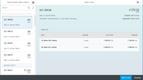
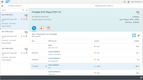
Presentation layer: This layer is the interface or way users interact with the software. Modern SAP products use SAP Fiori, a role-based UI accessible through a web browser or the SAP GUI desktop client. Different users see different apps depending on their job function.
-
Application layer: The engine that runs SAP’s business logic. When a transaction is submitted, this layer validates input, applies business rules, and coordinates updates across modules. It’s also where customizations and extensions live.
-
Database layer: The layer where all business data is stored. SAP Cloud ERP runs on HANA, SAP’s in-memory database that stores active data in RAM rather than on disk, enabling queries and analytics to run significantly faster than traditional databases.
All SAP modules share the same underlying database. When a sales order is created, it can automatically trigger inventory reservations, production orders, and accounting entries. Departments work from the same data rather than maintaining separate systems that require reconciliation.
SAP ERP Modules
SAP ERP is structured around functional modules. The core ones that appear across most implementations are:
- FI (Financial Accounting): General ledger, accounts payable, accounts receivable, asset accounting, and financial reporting.
- CO (Controlling): Internal cost management, profit center accounting, and management reporting. FI handles external financial reporting; CO handles internal analysis.
- MM (Materials Management): Procurement, inventory management, warehouse management, and invoice verification.
- SD (Sales and Distribution): Order management, pricing, shipping, billing, and customer master data.
- PP (Production Planning): Manufacturing orders, capacity planning, material requirements planning (MRP), and shop floor control.
- HCM (Human Capital Management): Payroll, time management, personnel administration, and organizational management.
- PM (Plant Maintenance): Equipment maintenance, work orders, and asset lifecycle tracking.
- PS (Project System): Project planning, budgeting, scheduling, and cost tracking.
Not every SAP implementation uses every module. A distribution company may have a completely different set of modules than a professional service company. A main part of implementing SAP ERP is deciding which modules the business actually needs and how they’ll be configured.
Key Features and Benefits
Real-time data across departments: Because all modules share a single database, changes in one area of the business are immediately visible across others. A procurement team creating a purchase order sees the same inventory levels the warehouse team sees.
Scalability: SAP Cloud ERP can support operations across multiple countries, currencies, and legal entities within a single system. For businesses expanding globally, this can reduce the need to run separate systems for different regions.
Built-in compliance tools: SAP has pre-configured settings for tax reporting, financial reporting standards (IFRS, US GAAP), and local regulatory requirements across dozens of countries. For multinational businesses, this matters.
Analytics and reporting: SAP’s analytics tools can pull operational data directly from the live system. SAP Analytics Cloud, which integrates with SAP Cloud ERP, provides planning, budgeting, and forecasting tools that work with the same data the business runs on.
AI capabilities: SAP has been adding AI-assisted features to SAP Cloud ERP, including automated invoice matching, cash flow predictions, and natural language querying. These are available to SAP’s modern ERP systems, and most don’t apply to SAP ECC unless a migration plan has been purchased.
SAP ERP Products
SAP has developed many ERP products over the years. Below are 3 of the most relevant ERP systems to know about in 2026.
SAP Cloud ERP
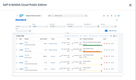
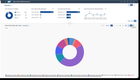
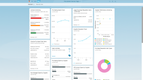
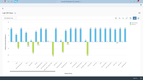
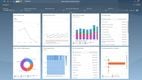
SAP Cloud ERP (formerly SAP S/4HANA) is SAP’s current flagship product and the platform the company is directing new customers and existing ECC users toward. It runs on the HANA in-memory database and is available as a cloud-hosted or on-premise deployment.
The cloud version comes in two editions: Public Cloud, a standardized multi-tenant deployment suited to companies willing to work within SAP’s best-practice processes, and Private Cloud, which offers greater customization for organizations with complex or industry-specific requirements. SAP Cloud ERP is best suited to mid-sized and enterprise organizations operating at scale.
SAP Business One
SAP Business One is SAP’s ERP product for small and mid-sized businesses. It covers finance, sales, purchasing, inventory, and production in a single system. Unlike SAP Cloud ERP, it’s designed to be implemented faster and with less customization overhead.
Business One is available on-premise or cloud-hosted through SAP partners. Pricing is not publicly listed by SAP and varies by reseller, deployment type, and user count. Most implementations go through value-added resellers (VARs) who handle setup, configuration, and ongoing support. It has a large partner network, which gives buyers more options for local implementation support.
SAP ERP Central Component (ECC)
SAP ECC is SAP’s legacy on-premise ERP system, the product that most large enterprises have run for the past two decades. It’s no longer actively sold, and SAP’s mainstream maintenance for it ends in 2027. Extended support is available after that at an additional cost, but SAP’s clear direction is to migrate to SAP Cloud ERP.
If you’re evaluating ERP systems, ECC cannot be purchased. It’s only relevant if you’re an existing customer managing a migration timeline.
Pros and Cons of SAP ERP
Pros:
- Covers virtually every business function in a single system
- Strong compliance and localization support for global operations
- Large partner and consultant network means implementation resources are available
- SAP Cloud ERP’s HANA database enables genuinely fast reporting on live data
- Well-established across industries like manufacturing, distribution, chemicals, utilities, retail, and professional services
Cons:
- Implementation costs and timelines are significant. Even mid-market SAP Cloud ERP projects can run into six figures and years to implement
- Pricing is not transparent; most deployments require quotes through SAP or a partner
- The learning curve is steep; SAP training and certification is its own industry for a reason
- Smaller organizations may find the system over-engineered for their actual needs
- Heavy customization can create upgrade problems down the line
Who Uses SAP ERP?
SAP Cloud ERP’s strengths in complex supply chain management, multi-entity financials, and regulatory compliance make it a natural fit for mid-sized enterprises and large global companies. Industries that typically adopt SAP include manufacturing, distribution, automotive, chemicals, utilities, consumer goods, retail, professional services, and the public sector. Explore our list of companies that use ERP to learn more.
SAP Business One serves smaller businesses, particularly in distribution, light manufacturing, and wholesale trade. Implementations are faster and pricing is more predictable than SAP Cloud ERP, though buyers typically work through a reseller rather than buying directly from SAP.
How to Implement SAP ERP
Implementing SAP ERP is a project in itself. The typical steps for an ERP implementation involve system design and scoping, data migration, configuration and customization, integration with other tools, testing, training, and go-live support. For SAP Cloud ERP, a new mid-market implementation generally takes 6-18 months while legacy SAP ECC implementations can take significantly longer, sometimes running multiple years.
Most SAP implementations involve a third-party partner or SAP’s own professional services team. For SAP Cloud ERP, SAP offers two packaged programs that bundle the software, infrastructure, and migration support into a single contract.
-
RISE with SAP is aimed at larger enterprises migrating from legacy systems like SAP ECC. It runs on the private cloud edition, which gives each customer their own dedicated environment and allows customization beyond SAP’s standard best practices, as many ECC users have years of custom code.
-
GROW with SAP is designed for mid-sized companies adopting SAP Cloud ERP for the first time. GROW is offered exclusively on the public cloud edition, emphasizing faster deployment through SAP’s standard best-practice processes.
SAP Alternatives
SAP isn’t the only major ERP system, and depending on your size, industry, and budget, another vendor may be a better fit. Here are some of the most common alternatives businesses consider:
-
Oracle NetSuite: A cloud-native ERP widely used by mid-market and growing companies. It’s often the first product buyers compare against SAP Cloud ERP, particularly for businesses that want a true cloud system without the implementation weight of SAP. Strong in financials, eCommerce, and multi-entity operations.
-
Microsoft Dynamics 365: Microsoft’s ERP suite, made up of Business Central (for small and mid-sized businesses) and Finance & Operations (for larger enterprises). It’s a natural choice for companies already invested in the Microsoft ecosystem.
-
Oracle Fusion Cloud ERP: Oracle’s flagship cloud ERP, aimed at large enterprises. It’s the closest direct competitor to SAP Cloud ERP in terms of scope, target customer, and complexity. It’s often shortlisted alongside SAP in enterprise ERP evaluations.
-
Acumatica: A cloud ERP focused on mid-market businesses, particularly in distribution, manufacturing, and construction. Its unlimited-user pricing model can be more predictable than SAP’s per-user licensing, which makes it attractive to growing companies with fluctuating headcount.